图的代码结构就是“流程图(画图)”的代码化。
画图元素:
* 图、节点(可带任务、任务条件)、连接(可带连接条件)
画图规则(或定义):
* 一个图(Graph),由多个节点(Node)和连接(Link)组成。
* 一个节点(Node),会有多个连接(Link)连向别的节点。
* 连接向其它节点,称为:“流出连接”。
* 被其它节点连接,称为:“流入连接”。
* 一个图“必须有且只有”一个 start 类型的节点,且从 start 节点开始,顺着连接(Link)流出。
通俗些,一个图就是通过 “点”(节点) + “线”(连接)画出来的一个结构。节点之间,采用平铺排列。
### 1、使用配置构建(支持 yml 或 json)
* 示例1 `demo1.yml`(简单示例)。
```yaml
id: "d1"
layout:
- { id: "s", type: "start", link: "n1"}
- { id: "n1", type: "activity", link: "e", task: "System.out.println(\"hello world!\");"}
- { id: "e", type: "end"}
```
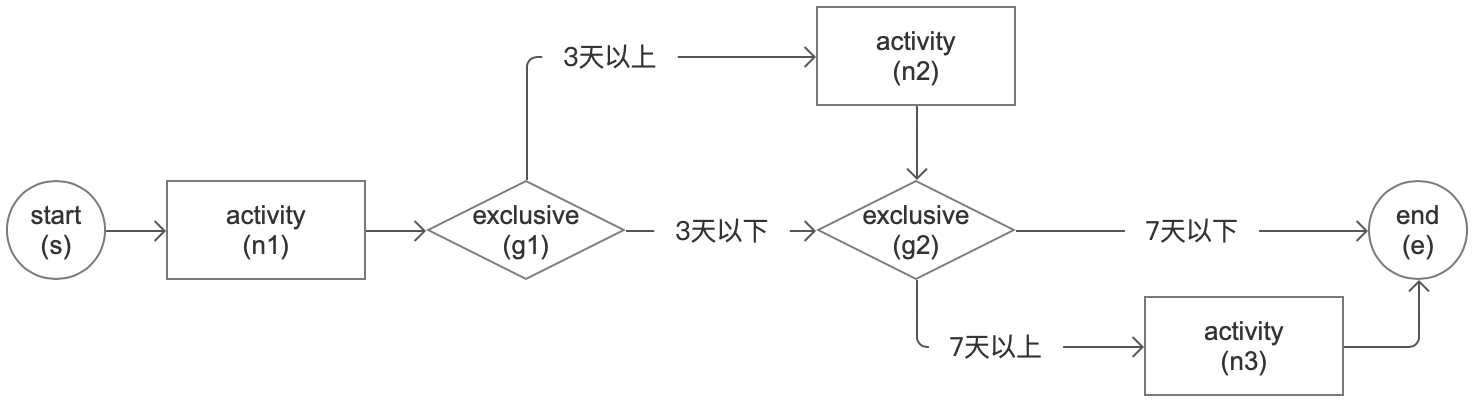
 * 示例2 `demo2.yml`(审批流程)。示例中,使用了元数据配置。
```yaml
id: "d2"
title: "请假审批"
layout:
- { id: "s", type: "start", title: "发起人", meta: {role: "employee", form: "form1"}, link: "n1"}
- { id: "n1", type: "activity", title: "主管批", meta: {role: "tl"}, link: "g1"}
- { id: "g1", type: "exclusive", link:[
{nextId: "g2"},
{nextId: "n2", title: "3天以上", when: "day>=3"}]}
- { id: "n2", type: "activity", title: "部门经理批", meta: {role: "dm"}, link: "g2"}
- { id: "g2", type: "exclusive", link:[
{nextId: "e"},
{nextId: "n3", title: "7天以上", when: "day>=7"}]}
- { id: "n3", type: "activity", title: "副总批", meta: {role: "vp"}, link: "e"}
- { id: "e", type: "end"}
# tl: team leader; dm: department manager; vp: vice-president
```
示意图:
* 示例2 `demo2.yml`(审批流程)。示例中,使用了元数据配置。
```yaml
id: "d2"
title: "请假审批"
layout:
- { id: "s", type: "start", title: "发起人", meta: {role: "employee", form: "form1"}, link: "n1"}
- { id: "n1", type: "activity", title: "主管批", meta: {role: "tl"}, link: "g1"}
- { id: "g1", type: "exclusive", link:[
{nextId: "g2"},
{nextId: "n2", title: "3天以上", when: "day>=3"}]}
- { id: "n2", type: "activity", title: "部门经理批", meta: {role: "dm"}, link: "g2"}
- { id: "g2", type: "exclusive", link:[
{nextId: "e"},
{nextId: "n3", title: "7天以上", when: "day>=7"}]}
- { id: "n3", type: "activity", title: "副总批", meta: {role: "vp"}, link: "e"}
- { id: "e", type: "end"}
# tl: team leader; dm: department manager; vp: vice-president
```
示意图:
 * 示例3 `demo3.yml`(业务规则)。示例中,使用了 `@` 组件型任务
```yaml
id: "d3"
title: "风控计算"
layout:
- { id: "s", type: "start", link: "n1"}
- { id: "n1", type: "activity", title: "基本信息评分", link: "g1", task: "@base_score"}
- { id: "g1", type: "exclusive", title: "分流", link: [
{nextId: "e", title: "优质用户(评分90以上)", when: "score > 90"},
{nextId: "n2", title: "普通用户"}]}
- { id: "n2", type: "activity", title: "电商消费评分", link: "n3", task: "@ec_score"}
- { id: "n3", type: "activity", title: "黑名单检测", link: "e", task: "@bl_score"}
- { id: "e", type: "end"}
```
示意图:
* 示例3 `demo3.yml`(业务规则)。示例中,使用了 `@` 组件型任务
```yaml
id: "d3"
title: "风控计算"
layout:
- { id: "s", type: "start", link: "n1"}
- { id: "n1", type: "activity", title: "基本信息评分", link: "g1", task: "@base_score"}
- { id: "g1", type: "exclusive", title: "分流", link: [
{nextId: "e", title: "优质用户(评分90以上)", when: "score > 90"},
{nextId: "n2", title: "普通用户"}]}
- { id: "n2", type: "activity", title: "电商消费评分", link: "n3", task: "@ec_score"}
- { id: "n3", type: "activity", title: "黑名单检测", link: "e", task: "@bl_score"}
- { id: "e", type: "end"}
```
示意图:
 ### 2、图配置的简化模式
属性简化:
* 当没有 `id` 属性时,会按顺序自动生成(格式示例:"n-1")
* 当没有 `link` 属性时,会按顺序自动连接后一个节点(适合简单的图,复杂的需手动指定)
* 当没有 `type` 属性时,缺省为 `activity` 节点类型
节点简化:
* 当没有 `type=start` 节点时,按顺序第一个节点为开始节点
* 当没有 `type=end` 节点时,不影响执行
以上面的 “简单示例” 为例,可以简化为:
```yaml
id: "d1"
layout:
- { type: "start"}
- { task: "System.out.println(\"hello world!\");"}
- { type: "end"}
```
或者(更简)
```yaml
id: "d1"
layout:
- { task: "System.out.println(\"hello world!\");"}
```
### 3、使用代码动态构建图(也称硬编码)
代码构建提供了更开放的机制,意味着可以自定义配置格式自己解析(比如,xml 格式),或者分解存放到持久层(比如,一个个节点存到 mysql)。
* 示例2(审批流程编排)。对就上面的配置
```java
import org.noear.solon.annotation.Bean;
import org.noear.solon.annotation.Configuration;
import org.noear.solon.flow.Chain;
import org.noear.solon.flow.FlowEngine;
@Configuration
public class Demo {
@Bean
public void case1(FlowEngine flowEngine){
Graph graph = Graph.create("d2", spec->{
spec.addStart("s").title("发起人").metaPut("role", "employee").metaPut("form", "form1").linkAdd("n1");
spec.addActivity("n1").title("主管批").metaPut("role", "tl").linkAdd("g1");
spec.addExclusive("g1")
.linkAdd("g2", l -> l.title("3天以下"))
.linkAdd("n2", l -> l.title("3天以上").condition("day>=3"));
spec.addActivity("n2").title("部门经理批").metaPut("role", "dm").linkAdd("g2");
spec.addExclusive("g2")
.linkAdd("e", l -> l.title("7天以下"))
.linkAdd("n3", l -> l.title("7天以上").condition("day>=7"));
spec.addActivity("n3").title("副总批").metaPut("role", "vp").linkAdd("e");
spec.addEnd("e");
});
//配置好后,执行
flowEngine.eval(graph, ...);
}
}
```
* 示例3(业务规则编排)。对就上面的配置
```java
import org.noear.solon.annotation.Bean;
import org.noear.solon.annotation.Configuration;
import org.noear.solon.flow.Chain;
import org.noear.solon.flow.FlowEngine;
@Configuration
public class Demo {
@Bean
public void case2(FlowEngine flowEngine){
Graph graph = Graph.create("d3", spec->{
spec.addStart("s").linkAdd("n2");
spec.addActivity("n1").title("基本信息评分").linkAdd("g1").task("@base_score");
spec.addExclusive("g1").title("分流")
.linkAdd("e", l -> l.title("优质用户(评分90以上)").condition("score > 90"))
.linkAdd("n2", l -> l.title("普通用户")); //没条件时,做为默认
spec.addActivity("n2").title("电商消费评分").linkAdd("n3").task("@ec_score");
spec.addActivity("n3").title("黑名单检测").linkAdd("e").task("@bl_score");
spec.addEnd("e").task(".");
});
//配置好后,执行
flowEngine.eval(graph, ...);
}
}
```
### 2、图配置的简化模式
属性简化:
* 当没有 `id` 属性时,会按顺序自动生成(格式示例:"n-1")
* 当没有 `link` 属性时,会按顺序自动连接后一个节点(适合简单的图,复杂的需手动指定)
* 当没有 `type` 属性时,缺省为 `activity` 节点类型
节点简化:
* 当没有 `type=start` 节点时,按顺序第一个节点为开始节点
* 当没有 `type=end` 节点时,不影响执行
以上面的 “简单示例” 为例,可以简化为:
```yaml
id: "d1"
layout:
- { type: "start"}
- { task: "System.out.println(\"hello world!\");"}
- { type: "end"}
```
或者(更简)
```yaml
id: "d1"
layout:
- { task: "System.out.println(\"hello world!\");"}
```
### 3、使用代码动态构建图(也称硬编码)
代码构建提供了更开放的机制,意味着可以自定义配置格式自己解析(比如,xml 格式),或者分解存放到持久层(比如,一个个节点存到 mysql)。
* 示例2(审批流程编排)。对就上面的配置
```java
import org.noear.solon.annotation.Bean;
import org.noear.solon.annotation.Configuration;
import org.noear.solon.flow.Chain;
import org.noear.solon.flow.FlowEngine;
@Configuration
public class Demo {
@Bean
public void case1(FlowEngine flowEngine){
Graph graph = Graph.create("d2", spec->{
spec.addStart("s").title("发起人").metaPut("role", "employee").metaPut("form", "form1").linkAdd("n1");
spec.addActivity("n1").title("主管批").metaPut("role", "tl").linkAdd("g1");
spec.addExclusive("g1")
.linkAdd("g2", l -> l.title("3天以下"))
.linkAdd("n2", l -> l.title("3天以上").condition("day>=3"));
spec.addActivity("n2").title("部门经理批").metaPut("role", "dm").linkAdd("g2");
spec.addExclusive("g2")
.linkAdd("e", l -> l.title("7天以下"))
.linkAdd("n3", l -> l.title("7天以上").condition("day>=7"));
spec.addActivity("n3").title("副总批").metaPut("role", "vp").linkAdd("e");
spec.addEnd("e");
});
//配置好后,执行
flowEngine.eval(graph, ...);
}
}
```
* 示例3(业务规则编排)。对就上面的配置
```java
import org.noear.solon.annotation.Bean;
import org.noear.solon.annotation.Configuration;
import org.noear.solon.flow.Chain;
import org.noear.solon.flow.FlowEngine;
@Configuration
public class Demo {
@Bean
public void case2(FlowEngine flowEngine){
Graph graph = Graph.create("d3", spec->{
spec.addStart("s").linkAdd("n2");
spec.addActivity("n1").title("基本信息评分").linkAdd("g1").task("@base_score");
spec.addExclusive("g1").title("分流")
.linkAdd("e", l -> l.title("优质用户(评分90以上)").condition("score > 90"))
.linkAdd("n2", l -> l.title("普通用户")); //没条件时,做为默认
spec.addActivity("n2").title("电商消费评分").linkAdd("n3").task("@ec_score");
spec.addActivity("n3").title("黑名单检测").linkAdd("e").task("@bl_score");
spec.addEnd("e").task(".");
});
//配置好后,执行
flowEngine.eval(graph, ...);
}
}
```